November 27th, 2025
Inbox, Signals, Custom Instructions, and more!
If you haven't opened Ferndesk in a while, it'll feel a lot different. We've quietly shipped changes that make Fern better at automatically suggesting updates to your help center and noticing patterns in your support, your code, and your docs.
Here are the updates I'm proudest of:
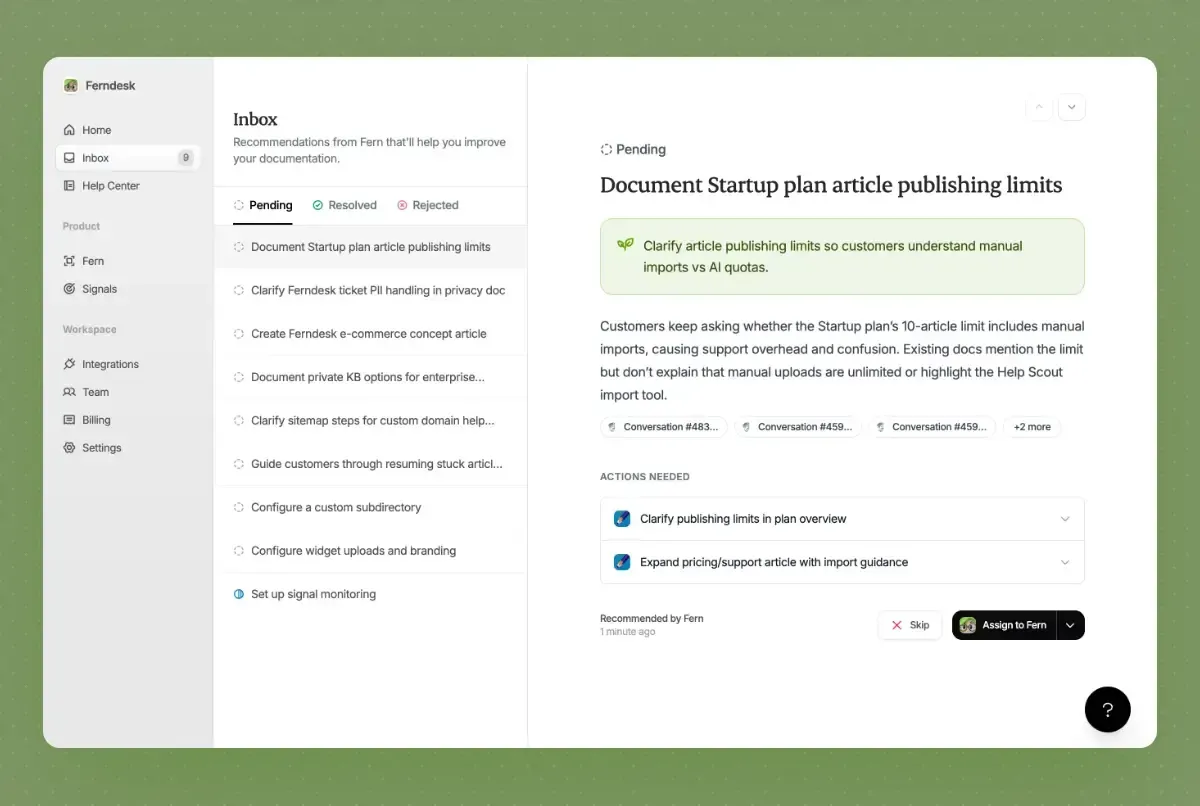
📊 Recommendations Inbox & Signals - Automatically get recommendations based on your support trends and now, codebase updates.
📝 Custom instructions for Fern - Save time on editing by teaching Fern your writing style.
⚡ 5x faster codebase search - Codebase search is now 6x faster, and Fern is more reliable than ever.
🎳 Documentation Coverage - View how many support requests have been covered by your docs over time.
📎 Task attachments - Upload PDFs, images, and DOCX files to give Fern more context.
dozens of smaller improvements and bug fixes
Customer spotlight: ISMS Copilot
ISMS Copilot, is a company dedicated to helping businesses with their Information Security Management System (ISMS) needs. They provide solutions to simplify and accelerate the process of achieving and maintaining ISMS compliance, ensuring their clients have robust security frameworks in place.
In this week's case study, Tristan Roth shows how he uses Ferndesk to save 20 hours a month on documentation.
"I do in 5 minutes what used to take one hour. I think it easily saves me 20h a month. We ship features every week. Updating docs is hell. Now Ferndesk makes it so easy I can just ship more and scale!"
Recommendations Inbox and Signals
A few months ago, we launched Audits. You could analyze support conversations from a specific time period to find content gaps. Early testers loved it, but I started noticing a pattern:
You'd run an audit, get overwhelmed by a huge batch of recommendations, work through a few, then wait another week for fresh insights. It felt reactive. Fern wasn't surfacing opportunities quickly enough for small teams.
The problem? We'd optimized for the wrong thing. We wanted to balance actionable recommendations with a way to drill into underlying data, so we built audits as discrete, time-boxed batches.
But that didn't feel smart or magical.
So we rebuilt the entire experience from scratch.
Introducing the Recommendations Inbox and Signals, the best of both worlds.
The Inbox continuously monitors your support conversations and product releases to surface the best recommendations without overwhelming you. No more waiting. No more massive batches. Just high-impact opportunities as they emerge, with detailed evidence panels and one-click actions.

The Signals page gives you the exploration tools you always wanted. Drill into support themes, documentation coverage, and now, product releases from GitHub, filter by date, and explore opportunities- all without waiting for an audit to run.

Together, Fern is now always watching, always learning, and always ready to help—while giving you full transparency into the data behind every recommendation.
Teach Fern your writing style
While Fern creates incredible documentation by default, you'd still spend time editing her output to match how your team actually writes.
Not anymore.
You can now customize Fern's research process and writing style with custom instructions.
To get started, click the Customize Fern button on the Fern page. You'll see two tabs:
Drafting instructions - Tell Fern how you want documentation written. Set your tone, structure preferences, style guidelines, and any company-specific requirements.
Research instructions - Guide how Fern gathers information. Tell her to prioritize your codebase over support tickets, require multiple sources before documenting features, or flag anything she can't verify.
Once you save your instructions, they apply to every task Fern works on across your entire team. No more repeating the same edits. No more inconsistent voice. Just documentation that sounds like you wrote it.
Fern: Harder, Better, Faster, Stronger
Over the last month, we've rewritten Fern from the ground-up to make her faster and more reliable.
6x faster code browsing: Fern can now browse your codebase and return results in under 30 seconds, making her research more thorough without the wait.
Support for complex, long-running tasks: We've re-architected Fern to help her handle very complex tasks that involve a lot of research and planning, which means fewer mistakes, and faster publishing.
Redesigned task view: Scanning Fern's working history is now much easier thanks to a few design choices we've made.
Improved visual capture: Fern now takes screenshots of publicly accessible websites faster and more reliably. We're working hard to bring support for pages behind logins!
Upload attachments to tasks
Now you can attach PDFs, images, DOCX and other text files files directly to tasks. Just drag them into the task creation dialog, and Fern will analyze them while creating your documentation.
This is perfect for:
Sharing PDF specs or product guides
Uploading screenshots you've already captured
Providing Word documents with detailed requirements
Fern can even run OCR on images to extract text and understand context better.
Smaller changes
Help center customization: Added support for custom fonts, font weights, and custom head/body code. Your help center can now match your brand perfectly.
Article SEO improvements: You can now edit meta descriptions and keywords directly in the SEO panel.
Better content editing: Fixed drag-and-drop in the content editor, improved responsiveness, and added clearer edit mode indicators.
Table editing enhancements: New grip handles and bubble menus make formatting tables much easier.
Contact widget improvements: You can now drag and drop images into contact messages. We also fixed bugs with email delivery.